If
you are prompted to create a new profile
Click next >
Type in your real name in the full name field
Type in your email address in the email field
Click next >
You can change your profile name or leave it as default as well,
you can change the folder your profile information will be stored
in, but the default value works just fine
Once you have made any changes you want to click next >
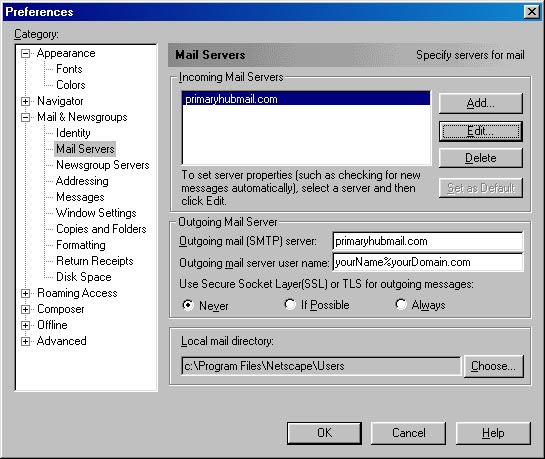
In the Outgoing mail (SMTP) server: field, type primaryhubmail.com
Click next >
In the Mail server user name: enter your email address
using a % instead of a @. (ex. userName%domainName.com)
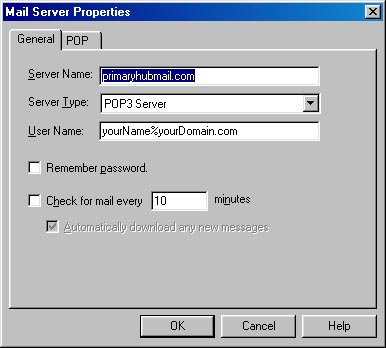
Enter primaryhubmail.com in the Incoming Mail Server:
field
Under Mail Server type: the POP3 option should
be selected
Click Finish
Note:
some ISP's such as Netzero, Extreme, and other Internet Service
Providers listen on smtp port 25 for email sent to their mail
servers. If this is the case, you will receive the error 'unable
to connect to server'. To remedy this, change your smtp port
settings in outlook from 25 to 26
If you
are using Microsoft Exchange Server, you will need to have
you Exchange Server administrator change the server settings
to receive mail
|