Outlook Express 5
|
Open
Outlook Express. |
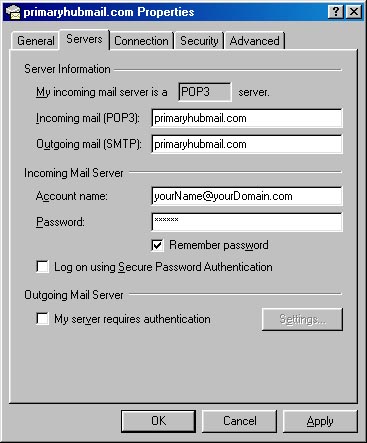
| In the Incoming mail(POP3): field, type primaryhubmail.com In the Outgoing mail(SMTP): field, type primaryhubmail.com In the Account name: field, type your entire email address (ex. yourName@yourDomain.com) In the password field, type your password Click the box Remember Password if you dont want to be prompted for your password every time Outlook Express attempts to collect your mail from this account click Ok click Close Internet Connection Wizard setup If you are prompted with the Internet Connection Wizard Select Use an existing Internet mail account Select Microsoft Windows Messaging or Exchange or Outlook Click Next Enter your real name in the Display Name: field click Next Select I already have an e-mail address that I'd like to use. In the E-mail address: field, type in your full email address (ex. yourName@yourDomain.com) Click Next The incoming mail server is a POP3 server The incoming mail(POP3, IMAP or HTTP) server: is primaryhubmail.com The outgoing mail(SMTP) server: is primaryhubmail.com Click Next The account name is your entire email address (ex. yourName@yourDomain.com) Enter your password Click the box Remember Password if you dont want to be prompted for your password every time Outlook Express attempts to collect your mail from this account Click Next Click Finish Note: some ISP's such as Netzero, Earthlink, Extreme, and other Internet Service Providers listen on smtp port 25 for email sent exclusively to their mail servers. You will not be able to send POP mail if you use these dialups. Please use the web interface at www.primaryhubmail.com. If you are using Microsoft Exchange Server, you will need to have you Exchange Server administrator change the server settings to receive mail |